• Extensions
  • Pricing

Pro add-on

Renewals · My Account

Subscription

Sell recurring products with billing intervals, free trials, signup fees, scheduled renewal orders, and customer self-service — all managed from Wow Extensions and WooCommerce → Wow Subscriptions.

  • 4 periods

    Day · Week · Month · Year

  • 15-min cron

    Scheduled renewals

  • 6 statuses

    Full lifecycle

  • Simple & variable

    Parent-level config

  • Signup fees & trials

    First-order cart fees

  • Invoice emails

    WC Customer Invoice

  • GDPR tools

    Export & erase

Features

Recurring revenue for WooCommerce

Subscription products

Mark simple or variable products as subscriptions under Product data → General. Variable products store config on parent; variations inherit.

Subscription records (CPT)

Internal wow-subscription post type under WooCommerce → Wow Subscriptions. Admin status dropdown, activity log (200 entries), renewal tracking.

Scheduled renewals

Cron every 15 minutes processes up to 50 due subscriptions. Creates pending renewal orders; optional Customer Invoice email with payment link.

Manual renewal payments

Customers pay renewal orders through normal WooCommerce checkout. No automatic off-session card capture — gateway-dependent.

My Account

New Subscriptions menu. List view + detail view with status, next payment, renewals count, Pay now, and optional cancel.

Cart rules

Optional one-subscription-product-per-cart. Signup fees summed as WooCommerce cart fee. Per-customer limit enforced at add-to-cart and record creation.

Privacy / GDPR

WordPress personal data exporter and eraser. Exports title, status, next payment. Eraser unlinks user ID and sets anonymized flag.

Storefront display

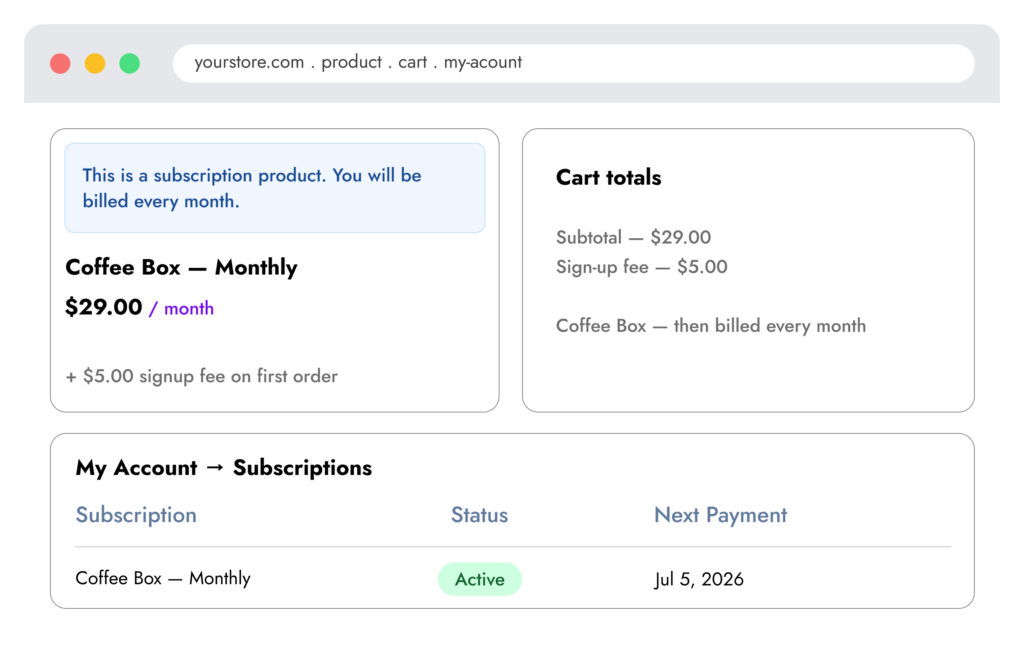
Price suffix (“every month”), product page notice, recurring summary in cart and checkout review.

Past-due & grace period

When renewal is due, subscription goes past-due and pending order is created. Configurable grace days (default 14) — subscriptions expire if still past-due with no pending order. 120-second lock prevents duplicate renewal orders.


Storefront preview

Recurring products across the buyer journey

Once a product is marked as a subscription, shoppers see billing rhythm on the product page, recurring summaries in cart, and manage subscriptions in My Account.

Subscription statuses

Full lifecycle management

Pending

Initial state before activation.

Active

Subscription is current and billing on schedule.

On hold

Paused — e.g. when product becomes unpurchasable at renewal.

Past due

Renewal order created, awaiting customer payment.

Cancelled

Customer or admin cancelled. Optional customer self-cancel in settings.

Expired

Grace period elapsed without payment.

Shortcode

Embed subscription list

Logged-in users only. Same template as My Account list.

 
My Account endpoints
  • wow_wsub_subscriptions
  • {myaccount}/wow-subscriptions/
    Subscription list
  • {myaccount}/wow-view-subscription/{id}/
    Detail + Pay now + Cancel

Product setup

Product data → General

Simple and variable products only.

 
Product meta fields
  • Subscription product
    Enable checkbox. Product is subscription when enabled and interval > 0.
     
  • Bill every
    Interval number + period: day, week, month, or year.
     
  • Sign-up fee (optional)
    One-time fee added to first order cart.
     
  • Free trial (days)
    Delays first renewal from payment date.
     
  • Max active subscriptions per customer
    0 = unlimited. Counts active, past-due, on-hold, pending.
     
  • Hide add to cart for roles
    Selected roles cannot purchase; buttons removed.

Hub settings

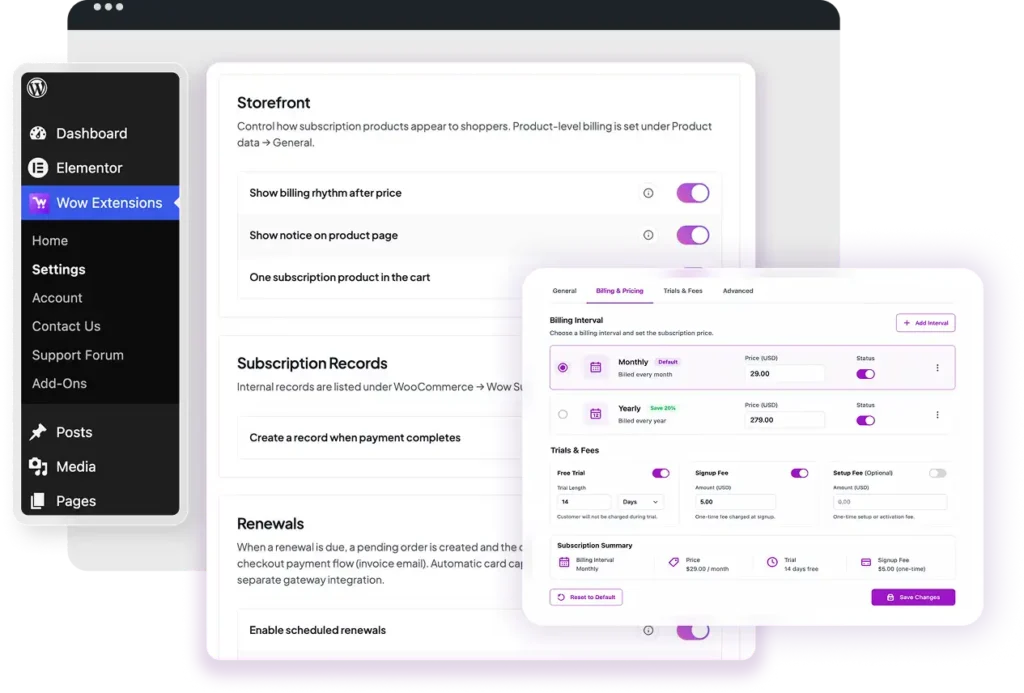
Every toggle

Option key: wow_wsub_settings

 
Storefront
  • Show billing rhythm after price
    Appends interval phrase to price HTML.
     
  • Show notice on product page
    Info box above add-to-cart for subscription products.
     
  • One subscription product in the cart
    Removes other subscription lines when adding a new one.
     
Records
  • Create a record when payment completes
    Creates CPT on paid / processing / completed initial orders. Requires logged-in customer.
     
     
Renewals
  • Enable scheduled renewals
    Schedules 15-minute cron when on.


  • Email invoice for renewal orders
    Sends WooCommerce Customer Invoice with payment URL.
     
     
  • Past-due grace (days)
    1–365 days before expiring past-due subscriptions (default 14).
     
     
Customer account
  • Allow customers to cancel
    Cancel button on detail view for active / past-due / on-hold.


  • Recurring summary in cart / checkout
    Extra rows showing billing rhythm per subscription line.


Renewal flow

How billing works

  • 1

    Initial purchase

    Customer buys subscription product. On payment complete, subscription record created with next payment date (trial + interval applied).

  • 2

    Renewal due

    Cron detects due date. Pending renewal order created. Subscription status → past-due. Invoice email sent if enabled.

  • 3

    Customer pays

    Customer uses Pay now link. On payment, next date recalculated, renewal count incremented, status → active.

Pricing

Pick the right plan for your store

Start free with Role Based Pricing and the hub dashboard. Upgrade individual Pro extensions or bundle everything you need.

Starter

Wow Subscription for WooCommerce

$49
1 Site | 1 Year
  • 1 Year Support
  • 1 Year Updates

Professional

Wow Subscription for WooCommerce

$99
3 Sites | 1 Year
  • 1 Year Support
  • 1 Year Updates

Business

Wow Subscription for WooCommerce

$149
10 Sites | 1 Year
  • 1 Year Support
  • 1 Year Updates

30-day money-back guarantee on all paid plans. Prices shown are placeholders for the static demo.

FAQ

Common questions

  • Does it support automatic recurring payments?

    Renewals create pending orders and invoice emails. Automatic card capture requires your payment gateway — not included in v1.0.0.

  • Can guests subscribe?

    Subscription records require a logged-in user ID. Guest checkout does not create records.

  • Where are records stored?

    Custom post type wow-subscription under WooCommerce → Wow Subscriptions in admin.

  • Can customers cancel?

    Yes, when enabled in settings. POST handler with nonce and ownership verification on My Account detail page.

  • What developer hook exists?

    wow_wsub_subscription_status_changed — fired when status changes via the subscription class.

More extensions

Explore other Wow Extensions

free

Role Based Pricing

Discounts and visibility by user role.

pro

Checkout Field Editor

Customize billing, shipping, and additional fields.

pro

One Page Checkout

Faster checkout flows.