• Extensions
  • Pricing

Free · Built-in

Wow Extensions Hub

Sales Notifications

Build trust with social-proof purchase popups powered by real orders, latest products, hand-picked products or categories, and recently viewed items — with full control over message text, design, position, and timing.

  • 5 data sources

    Orders to recently viewed

  • 22 templates

    Plus flat color styling

  • 4 positions

    Any screen corner

  • Real order proof

    Pull genuine recent purchases

  • Shortcode messages

    Name, city, product, time ago

  • Privacy masking

    Partially hide customer info

  • Timing control

    Delay, duration, and loop

Features

Everything Sales Notifications can do

Five data sources

Choose where notification content comes from: real orderslatest productsselected productsselected categories, or recently viewed items.

Message shortcodes

Write one template per line and let the popup rotate through them using {first_name}{city}{product}{product_with_link}{time_ago}{custom}, and {number}.

Privacy & virtual data

Mask names and locations in real-order notifications, or supply your own list of virtual customer names and cities — one per line.

Design controls

22 background templates plus a flat-color mode, highlight / text / background colors, border radius, and an optional close icon.

Position & timing

Pin popups to any corner, then tune the initial delay, how long each notification stays, and the gap before the next one appears.

Single product mode

On product pages, show notifications for the current product only or for other products in the same category — and open links in a new tab if you prefer.

Built for performance

Products load over AJAX by default, or embed inline in the page when you would rather skip the request. Payloads are cached with a rotating prefix that busts automatically on new and updated orders, mobile display is a single toggle, and dismissals are remembered with a cookie so the popup stays closed.

Storefront preview

What shoppers see while they browse

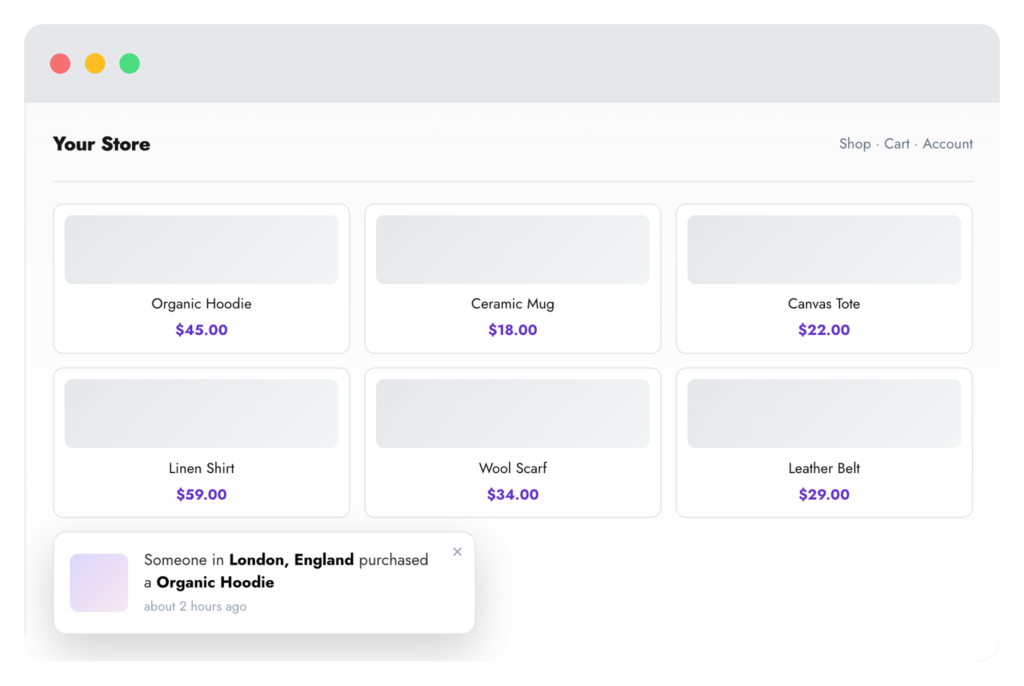
A compact popup slides in over your shop, shows a real or curated purchase, then makes way for the next one.

Data sources

Choose what the popups talk about

One setting decides where notification products come from.
Real orders

Genuine recent purchases

Reads recent WooCommerce orders in the statuses you allow, within your chosen time window, and skips any excluded products. Customer info can be masked.
Curated

Products & categories

Use the latest published products, a comma-separated list of product IDs, or every product in selected categories — great for new stores with few orders.
Recently viewed

Personal to each visitor

Shows items the visitor has already looked at, tracked through the standard WooCommerce recently-viewed cookie (last 15 products).

Configuration

Global settings reference

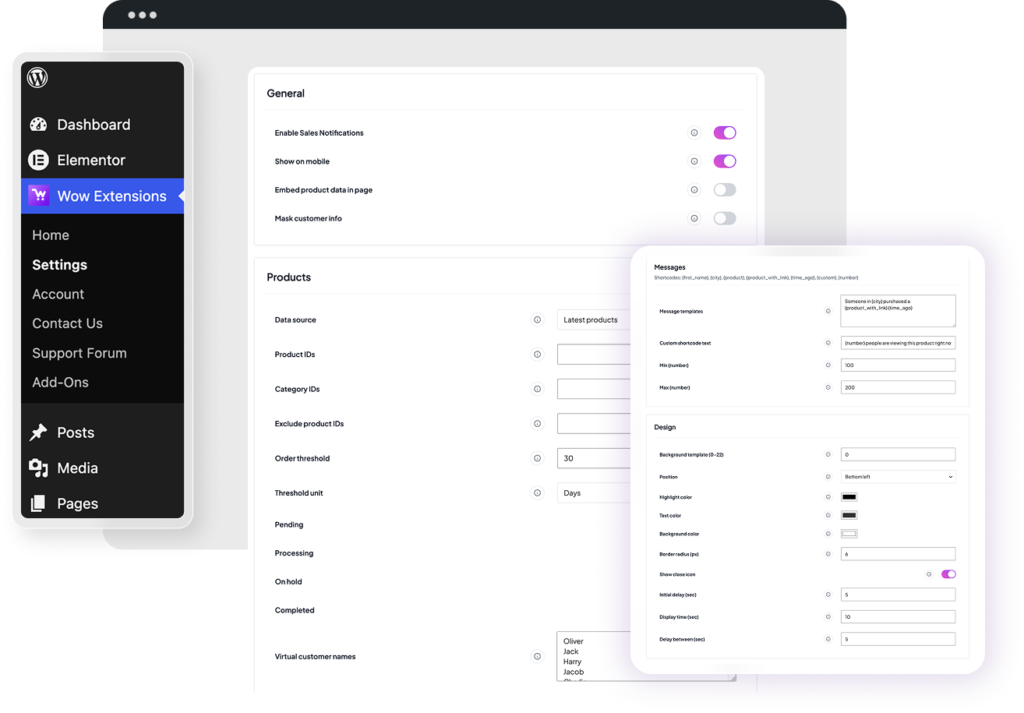
Stored in wowexfow_sales_notification_settings. Saved from Wow Extensions → Settings → Sales Notifications, grouped into General, Products, Messages, Design, and Single product page.
General
  • Enable Sales Notifications
    Master switch for storefront popups.
  • Show on mobile
    Display notifications on phones and tablets.
  • Embed product data in page
    Load products inline instead of over AJAX.
  • Mask customer info
    Partially hide names and locations in real-order notifications.
Products
  • Data source
    Real orders, latest products, selected products, selected categories, or recently viewed.
  • Product IDs / Category IDs
    Comma-separated lists used by the selected-products and selected-categories sources.
  • Exclude product IDs
    Products that never appear in real-order notifications.
  • Order threshold & unit
    Only include orders from the last N minutes, hours, or days.
  • Order statuses
    Pending, processing, on-hold, completed — toggle each one.
  • Virtual names / cities / time range
    Fallback identities, one per line, with a randomized “time ago” window in hours.
  • Include out-of-stock products
    Allow out-of-stock items to appear.

How it works

From setup to storefront

  • 1

    Enable in the hub

    Activate Sales Notifications on Wow Extensions → Home. It is enabled by default on plugin activation.

  • 2

    Pick a source & message

    Choose real orders or curated products, set your order statuses and time window, then write the message templates shoppers will read.

  • 3

    Style it and time it

    Select a background template, colors, and corner, then set the initial delay, display time, and gap between notifications.

FAQ

Common questions

  • Are the notifications real?

    They can be. With the real-orders source, popups are built from actual WooCommerce orders in the statuses and time window you allow. The other sources show products instead, paired with your virtual name and city lists.

  • Can I hide customer names?

    Yes. Turn on “Mask customer info” to partially hide names and locations in real-order notifications, or switch to a curated source that never touches order data.

  • Will it slow my store down?

    Product payloads are cached in transients and served over a single AJAX request after the page loads. You can also embed the data inline to skip the request entirely.

  • Can visitors dismiss the popups?

    When the close icon is enabled, closing a notification sets a cookie and no further popups are shown to that visitor.

  • Where are settings stored?

    In the wowexfow_sales_notification_settings option, managed from Wow Extensions → Settings → Sales Notifications.

More extensions

Explore other Wow Extensions

Pro

One Page Checkout

Product selection and checkout on one page.

pro

Checkout Field Editor

Customize billing, shipping, and additional fields.

pro

Subscription

Recurring products, renewals, and My Account.
