Label + type picker. Select fields get pipe-separated options. Auto-generated keys: billing_cfe_*,
shipping_cfe_*, or cfe_* for additional.

Modular tools for pricing, checkout, and subscriptions — all from one hub.
Wholesale, VIP, and member pricing rules
Product pick and checkout on one page
Custom billing, shipping, and order fields
Recurring products, renewals, and My Account
Recurring products, renewals, and My Account
Recurring products, renewals, and My Account
Advanced widgets and sliders for Elementor — build stunning, responsive pages faster.
24/7 assistance from our expert team.
Step-by-step documentation and in-depth guides covering every Wow Elements features
Fresh ideas, design trends, WordPress updates, and expert tips.
Track our journey of improvements, feature releases, and performance upgrades.
Have questions, feedback, or business inquiries? Reach out anytime
Customize WooCommerce checkout without editing theme files. Manage billing, shipping, and additional fields — add custom fields, reorder with drag-and-drop, toggle required, and validate — all from Wow Extensions → Settings.
Billing · Shipping · Additional
Text to checkbox
Priority 0–999
SPA section navigation
Unlimited per section
Emails & order details
Restore WC defaults
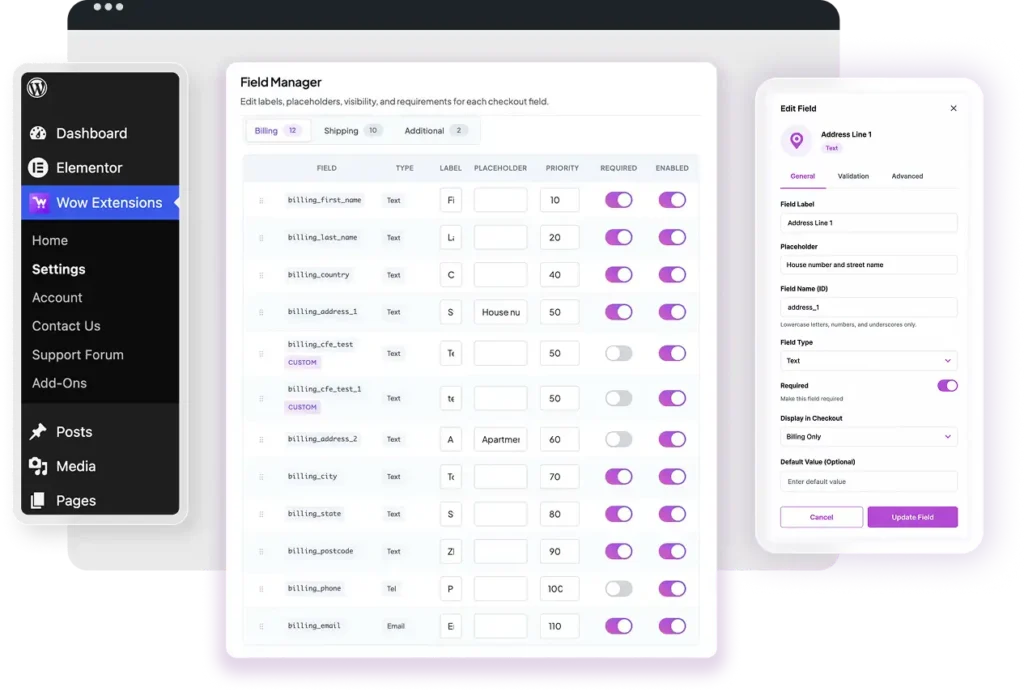
Tabbed interface with live section counts. Each field row shows key, type pill, label, placeholder, priority, Required toggle, and Enabled toggle.
Label + type picker. Select fields get pipe-separated options. Auto-generated keys: billing_cfe_*,
shipping_cfe_*, or cfe_* for additional.
Toggle required per field. Disabled fields are stripped from checkout. Country locale can override required on address fields unless override is enabled internally.
Text, textarea, email, tel, number, url, select, checkbox — for custom fields in admin.
Filters
woocommerce_billing_fields,
woocommerce_shipping_fields, and woocommerce_checkout_fields. Validates email, phone, number, url on checkout submit.
WC 8.8+ billing integration via woocommerce_register_ additional_checkout_field. Overrides core billing labels, required, priority, hidden. Requires saved billing config.
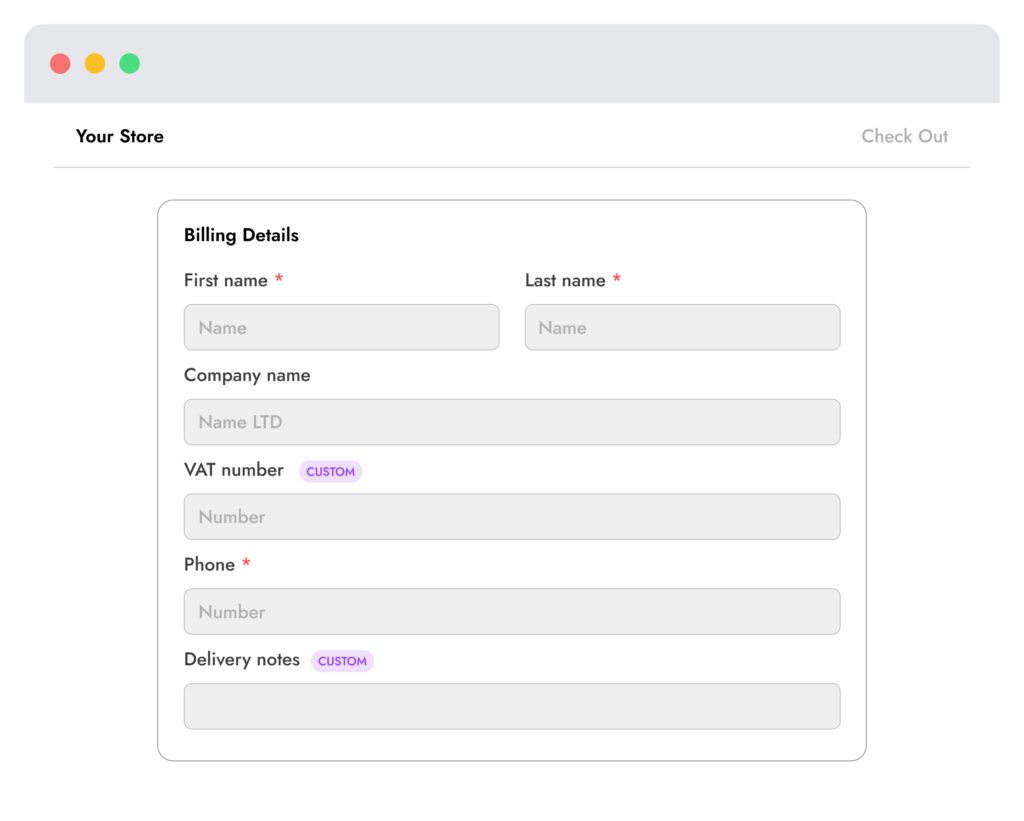
Custom values saved to order meta. Shown in emails and “Additional information” on thank-you / order view when enabled.
woocommerce_enable_order _notes_field — enabled when any additional field is active; can remove order comments if disabled in manager.
Core WooCommerce billing, shipping, and order field keys are protected. Custom fields cannot collide with reserved names. Validation rules supported in sanitizer: email, phone, number, url, postcode.
After saving field changes in the hub, shoppers see reordered labels, new custom fields, and required validation on the live checkout page.
All standard billing address fields plus custom fields. Stored in wow_cfe_fields_billing. Block checkout maps 10 core keys to WooCommerce Blocks.
Shipping address fieldset. Classic checkout only in current version. Stored in wow_cfe_fields_shipping.
Includes order comments and custom additional fields. Stored in wow_cfe_fields_additional. Classic checkout only.
Install Wow Extensions + this add-on. Activate on Wow Extensions → Home (auto-enabled on plugin activation).
Open Wow Extensions → Settings → Checkout Field Editor. Switch Billing, Shipping, or Additional tabs. Drag to reorder, edit labels, add custom fields.
Click “Save checkout fields” for the active section. Fields appear on storefront checkout. Values stored in order meta.
Start free with Role Based Pricing and the hub dashboard. Upgrade individual Pro extensions or bundle everything you need.
Wow Checkout Field Editor for WooCommerce
Wow Checkout Field Editor for WooCommerce
Wow Checkout Field Editor for WooCommerce
30-day money-back guarantee on all paid plans. Prices shown are placeholders for the static demo.
Wow Extensions → Settings → Checkout Field Editor. Section URL param: cfe_section=billing|shipping|additional.
No. Only the active section is written on save. Other stored sections remain unchanged.
Turn off the Enabled toggle and save the section. Disabled fields are removed from checkout.
Use “Reset section to defaults” — deletes the stored option for that section and falls back to WooCommerce defaults.
Yes, for custom enabled fields with show-in-email flag (default on for new custom fields).
Users with manage_woocommerce capability.
Discounts and visibility by user role.
Customize billing, shipping, and additional fields.
Recurring products, renewals, and My Account.
Install the free core plugin today and enable Pro extensions when you’re ready to grow.

Powerful, modular extensions for WooCommerce — built for store owners, agencies, and developers.
Copyright @ 2026 Wow Extensions. All Rights Reserved.