• Extensions
  • Pricing

Pro add-on

Requires Wow Extensions

One Page Checkout

Let customers pick products and complete WooCommerce checkout on the same page. Embed with a shortcode, show checkout on product pages, and update the cart with AJAX — no page reloads.

  • 3 layouts

    Grid · List · Dropdown

  • AJAX cart

    Add · Remove · Qty

  • Classic checkout

    Embedded WC form

  • Shortcode embed

    Any page or post

  • Product pages

    Per-product enable/disable

  • Cart rules

    Empty or auto-fill on load

  • HPOS compatible

    WC 5.0 – 9.6 tested

Features

Reduce friction from browse to buy

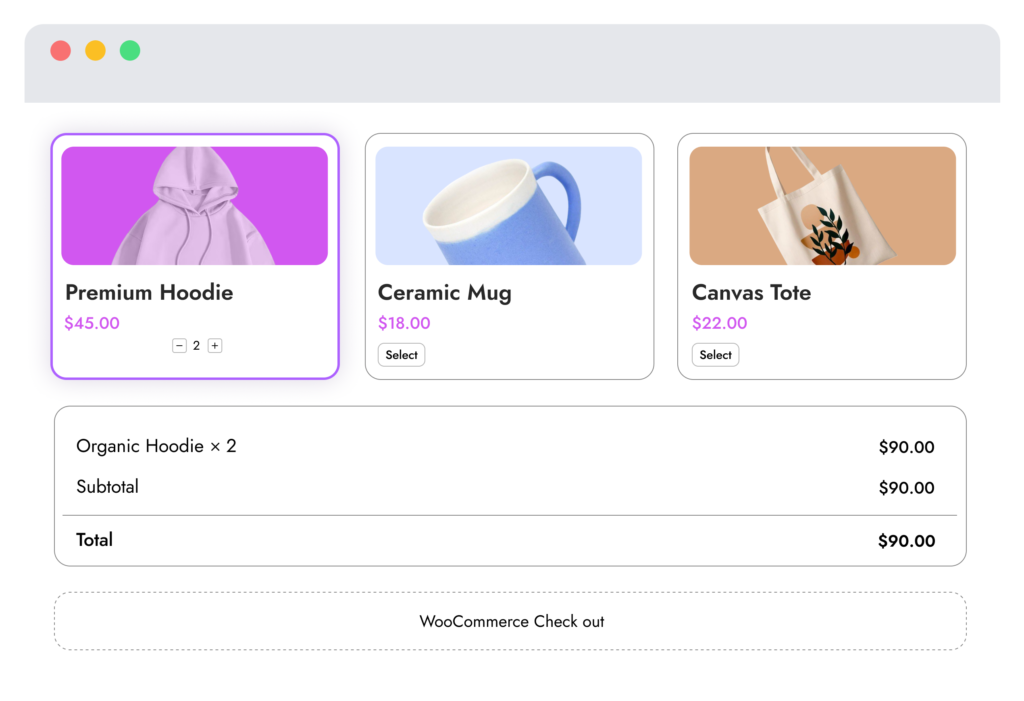
Multi-product one-page checkout

Shortcode 

No products found.

 renders a product catalog (up to 50 products) plus classic WooCommerce checkout on one page.

AJAX cart updates

Add, remove, and change quantity without full page reload. Order review HTML refreshes via AJAX. Loading states on product cards.

Single product checkout

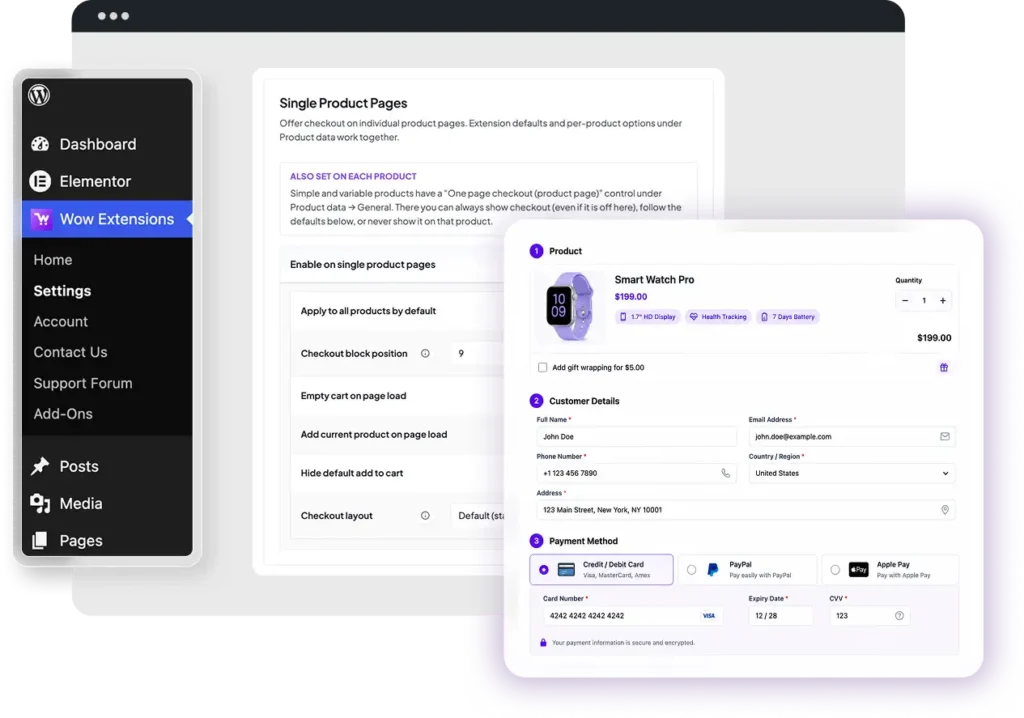
Embed checkout on individual product pages via woocommerce_ single_product_summary 

hook with configurable priority (default 9).

Two-column layout

Optional two_column layout on product pages — gallery and summary side by side (theme-dependent).

Hide default add to cart

Optionally remove the standard add-to-cart template on simple products when checkout is embedded (variable products keep variation form).

Cart rules on load

Empty cart on page load, auto add current product (single), or auto add all catalog products (multi) — each configurable independently.

Per-product controls

Product data → General → One page checkout (product page): Default (follow extension), Always show checkout, or Never show checkout. Works on simple and variable products. Overrides global “Apply to all products” setting.


Developer filter

wow_opc_single_ product_enabled — final gate for whether checkout shows on a product page.

Hub settings UI

Card-based settings with tooltips, conditional sub-fields, and built-in shortcode reference panel under Wow Extensions → Settings → One Page Checkout.


Storefront preview

One page — products and checkout together

After embedding the shortcode, shoppers pick products from a grid and complete payment without leaving the page. Cart updates happen via AJAX.

Shortcode

Embed anywhere

Place on any page or post. Returns empty in admin. Enqueues frontend CSS/JS automatically.

 
wow_one_page_checkout
  • wow_one_page_checkout
    Default catalog + checkout
  • wow_one_page_checkout product_ids="12,34,56"
    Specific products in ID order
  • wow_one_page_checkout category="clothing"
    Comma-separated category slugs
  • wow_one_page_checkout display="list" columns="2"
    display: grid | list | dropdown
  • Hide price for roles
    Selected roles see no price HTML on product pages.
  • Hide add to cart for roles
    Selected roles cannot purchase; buttons removed.

Settings

Every hub option

Option key: wow_opc_settings

 
Single product pages
  • Enable on single product pages
    Master toggle for product-page checkout embed.
  • Apply to all products by default
    On: all products unless set to Never show. Off: only Always show products.
  • Checkout block position
    Hook priority 1–100 on product summary (default 9).
     
  • Empty cart on page load
    Clears cart once when product page loads.
     
  • Add current product on page load
    Auto-adds simple (qty 1) or first purchasable variation.
     
  • Hide default add to cart
    Removes standard add-to-cart on simple products.
     
  • Checkout layout
    default stacked or two_column flex layout.
     
     
Multi-product (shortcode)
  • Display style
    Grid, list, or dropdown.
     
  • Grid columns
    1–6 columns for grid layout.
     
  • Show product images
    Thumbnail in grid/list (not dropdown).
     
     
  • Show descriptions
    Short description trimmed to 15 words.
     
     
  • Button text
    Custom label; empty defaults to “Select”.
     
     
  • Empty cart on page load
    Once per full page request when shortcode renders.
     
     
  • Add all catalog products on page load
    Auto-adds every purchasable product in the query.


How it works

Get live in minutes

  • 1

    Install & activate

    Wow Extensions + WooCommerce + this add-on. Enable on Wow Extensions → Home (auto-enabled on activation).

  • 2

    Configure settings

    Set display style, cart rules, and single-product behavior under Wow Extensions → Settings → One Page Checkout.

  • 3

    Embed & sell

    Add shortcode to a landing page or enable checkout on product pages. Customers pick products and pay on the same screen.

Pricing

Pick the right plan for your store

Start free with Role Based Pricing and the hub dashboard. Upgrade individual Pro extensions or bundle everything you need.

Starter

Wow One Page Checkout for WooCommerce

$49
1 Site | 1 Year
  • 1 Year Support
  • 1 Year Updates

Professional

Wow One Page Checkout for WooCommerce

$99
3 Sites | 1 Year
  • 1 Year Support
  • 1 Year Updates

Business

Wow One Page Checkout for WooCommerce

$149
10 Sites | 1 Year
  • 1 Year Support
  • 1 Year Updates

30-day money-back guarantee on all paid plans. Prices shown are placeholders for the static demo.

FAQ

Common questions

  • Does it work without Wow Extensions?

    No. This plugin registers as a hub extension and requires Wow Extensions for WooCommerce.

  • Does it use checkout blocks?

    No. It embeds the classic WooCommerce checkout form. Block compatibility is declared for WooCommerce feature flags only.

  • Can I show checkout on only some products?

    Yes. Turn off “Apply to all products by default” and set individual products to Always show checkout under Product data → General.

  • What AJAX actions are available?

    wow_opc_add_to_cart, wow_opc_remove_from_cart, wow_opc_update_qty — all nonce-protected for guests and logged-in users.

More extensions

Explore other Wow Extensions

free

Role Based Pricing

Discounts and visibility by user role.

pro

Checkout Field Editor

Customize billing, shipping, and additional fields.

pro

Subscription

Recurring products, renewals, and My Account.