
Free · Built-in
Wow Extensions Hub
Min/Max Quantities
Set minimum and maximum order quantities per product, per variation, and for the entire cart — plus cart subtotal limits, quantity input caps, and automatic checkout blocking when rules are not met.
-
Product & variation
Own limits for each
-
Cart-wide rules
Quantity & subtotal
-
No coding
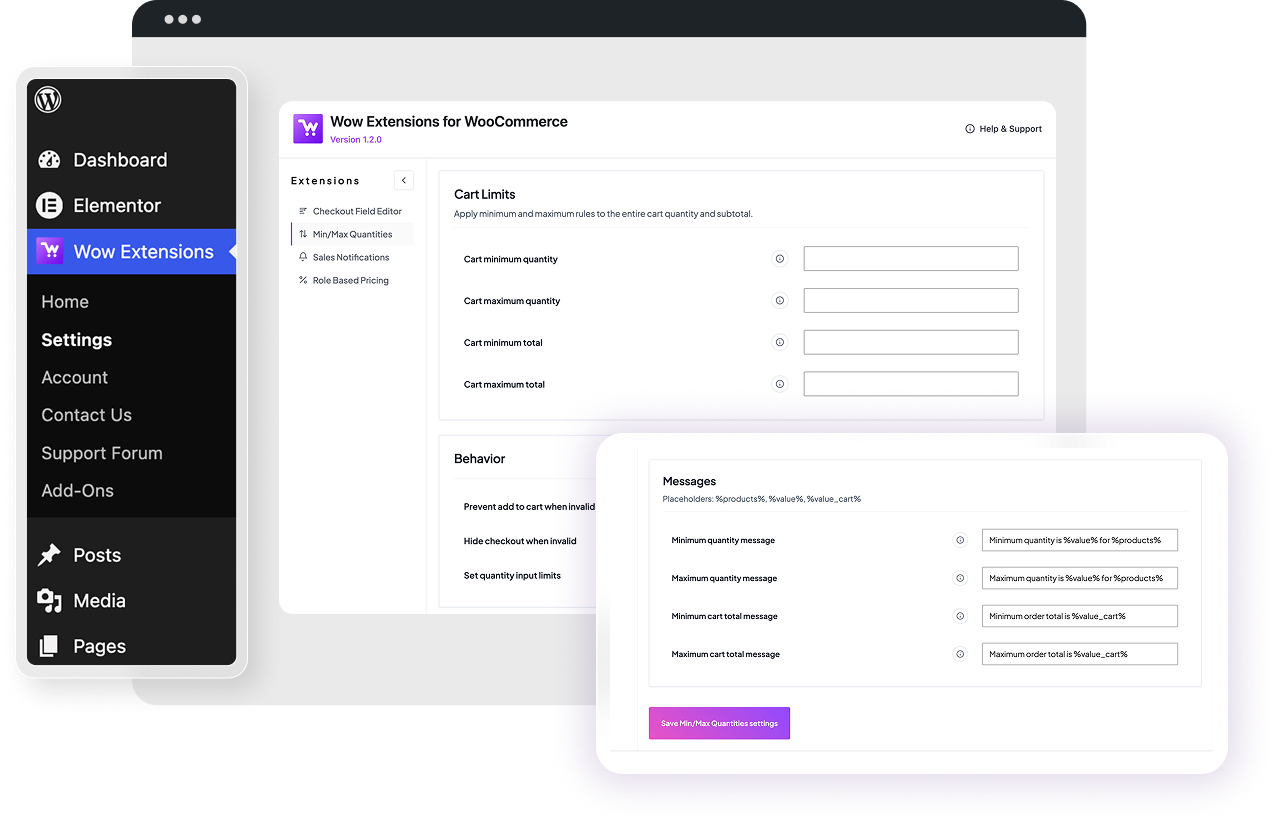
Hub settings UI
-
Per product limits
Minimum and maximum quantity fields
-
Per variation limits
Each variation gets its own range
-
Cart quantity & total
Store-wide floor and ceiling
-
Quantity input caps
min / max on number inputs
Features
Everything Min/Max Quantities can do
Product & variation quantity limits
Add Minimum quantity and Maximum quantity fields to any product under Product data → Inventory. Variable products get the same pair on every variation row, validated independently from the parent.
- Quantities are summed across all matching cart lines before checking
- Variation totals checked against variation limits, parent totals against parent limits
- Leave a field empty to disable that limit for the product
- Stored as _wowexfow_min_qty / _wowexfow_max_qty product meta
Cart quantity limits
Cart total limits
Prevent add to cart
Hide checkout when invalid
Hide the proceed-to-checkout buttons on cart and mini-cart while validation errors exist, so nobody reaches checkout with an invalid order.
Quantity input limits
Apply the product min and max directly to WooCommerce quantity inputs on product and cart pages — the stepper simply won’t go out of range.
all variations inherit the same mode and override settings. Hooks both simple and variation calculated prices.
Custom notice messages
%products%, %value%, and %value_cart% placeholders — separate templates for minimum quantity, maximum quantity, minimum cart total, and maximum cart total. Duplicate notices are de-duplicated per request. Storefront preview
What customers see when a rule is broken
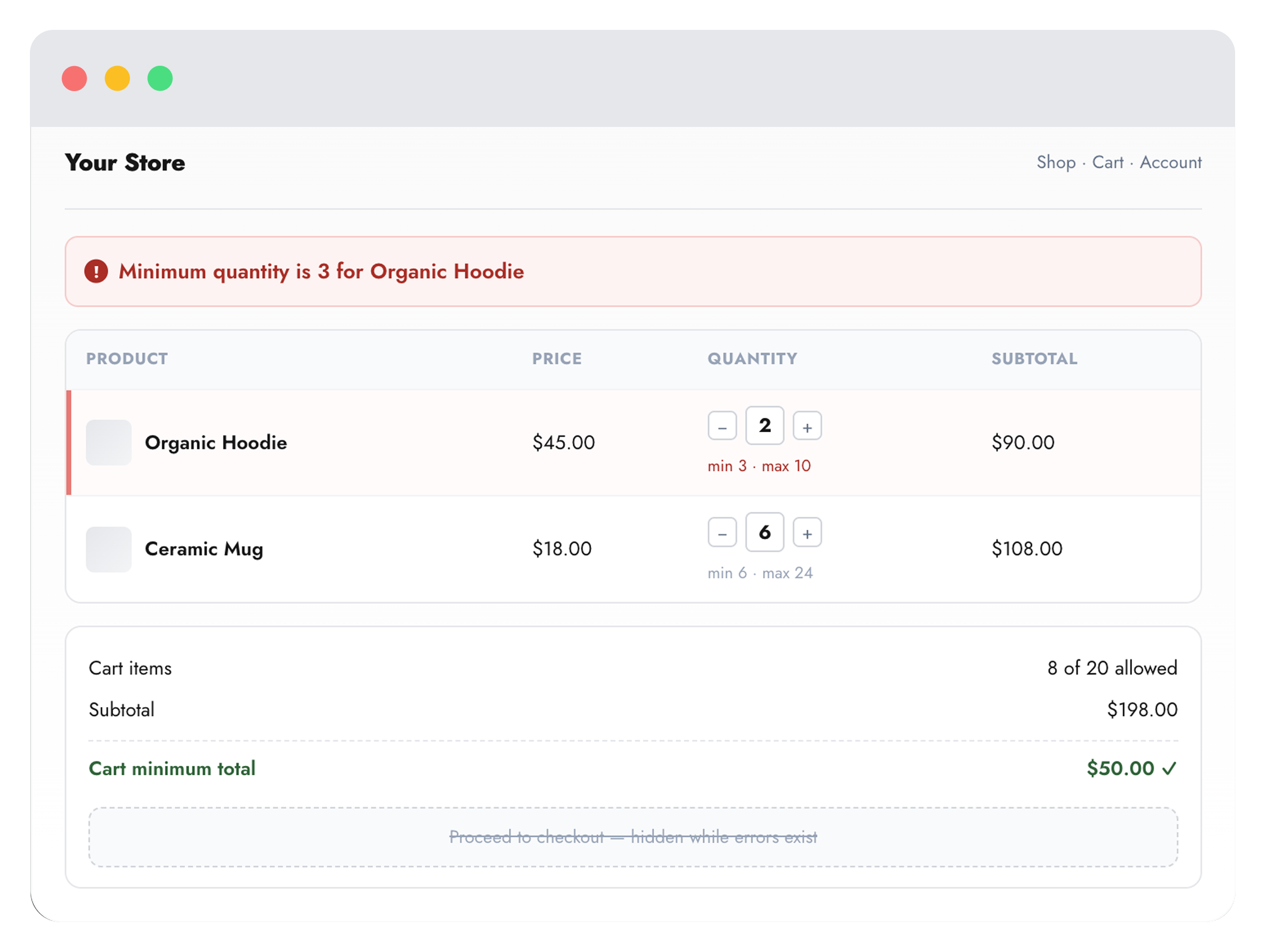
- Notice text comes from your own message template with %products% and %value% filled in.
- Quantity steppers are capped at the product min and max values.
- Checkout buttons disappear on cart and mini-cart until every rule passes.
- Checkout buttons disappear on cart and mini-cart until every rule passes.
Rule levels
Three levels of limits, checked together
Per product
Per variation
Each variation row gets its own minimum and maximum fields, validated against that variation’s own quantity in the cart.
Whole cart
Global minimum and maximum item count plus minimum and maximum subtotal, configured once in the hub for the whole store.
Configuration
Global settings reference
wowexfow_minmax_settings. Saved from Wow Extensions → Settings → Min/Max Quantities. Leave any numeric field empty to disable that rule. -
Cart minimum quantity
Minimum total number of items allowed in the cart.
-
Cart maximum quantity
Maximum total number of items allowed in the cart.
-
Cart minimum totalMinimum cart subtotal before checkout.
-
Cart maximum totalMaximum cart subtotal before checkout.
-
Prevent add to cart when invalid
Blocks adds that would break a rule and reverts invalid cart quantity updates.
-
Hide checkout when invalid
Hides checkout buttons on cart and mini-cart while validation errors exist.
-
Set quantity input limits
Applies product min and max to quantity inputs on product and cart pages. On by default.
How it works
From setup to storefront
-
1
Enable in the hub
Activate Min/Max Quantities on Wow Extensions → Home. It is enabled by default on plugin activation.
-
2
Set cart-wide rules
Add cart quantity and subtotal limits, then choose whether to block add-to-cart, hide checkout, and cap quantity inputs.
-
3
Add per-product limits
Open any product, go to Product data → Inventory, and set minimum and maximum quantities — including per variation.
FAQ
Common questions
-
Are limits counted per cart line or per product?
Per product. Quantities are summed across every cart line for the same product (or the same variation) before the rule is checked, so splitting an item into two lines cannot bypass a maximum.
-
How do variation limits interact with parent limits?
Both are evaluated. A variation’s quantity is checked against the variation fields, and the combined quantity of all variations is checked against the parent product fields.
-
Do cart total limits include tax?
Yes. The cart total used for validation is the sum of line totals plus line tax, matching what the customer is charged.
-
What happens if someone edits the quantity to an invalid value?
With “Prevent add to cart when invalid” enabled, the update is reverted to the previous quantity. With it off, the cart shows an error notice and — if enabled — the checkout buttons are hidden.
-
Where are the settings stored?
Global rules live in the wowexfow_minmax_settings option. Product limits are stored as _wowexfow_min_qty / _wowexfow_max_qty meta (variations use the _var suffix).
More extensions
Explore other Wow Extensions
One Page Checkout
Product selection and checkout on one page.
Checkout Field Editor
Customize billing, shipping, and additional fields.
Subscription
Recurring products, renewals, and My Account.
